Click-to-WhatsApp Ads: The Complete Playbook for Lead Generation
Click-to-WhatsApp (CTWA) ads are the shortest path on the internet between a stranger and a sales conversation. One tap on a Facebook or Instagram ad opens a WhatsApp chat with your business — no landing page, no form, no waiting. For teams selling considered purchases, from education programs to logistics services, that single tap is where conversion rates are won or lost.
This playbook walks through the full chain: what CTWA ads are, how to set them up correctly, how to design the conversation funnel after the tap, and how to measure what actually matters. It reflects how we run these campaigns for our own growth at GeneX — including the mistakes we made first so you can skip them.
What Click-to-WhatsApp ads actually are
CTWA ads are ads on Facebook and Instagram with a Send Message call-to-action. When someone taps it, they land directly in a WhatsApp conversation with your business number, usually with a pre-filled message such as "I saw this on Facebook."
Three properties make them unusually effective for lead generation:
- [ ] Zero-form friction. Traditional lead-gen ads push people to fill in name, email, and phone — and lose most of them at every field. CTWA ads skip the form entirely: the prospect's identity is their WhatsApp number, already verified by the app.
- [ ] Mobile-native intent. Almost all social ad impressions happen inside mobile apps and in-app browsers. A chat interface is the most natural destination a mobile user can land on.
- [ ] Opt-in by default. A conversation only counts once the person sends a message. Every lead in your inbox has taken a deliberate action — they are not passive form-fills.
What CTWA ads are not: ads displayed inside WhatsApp itself. Meta does not currently serve conventional ads in the WhatsApp feed. CTWA is a Meta Ads product whose destination is WhatsApp.
Prerequisites before you spend a dollar
Getting these right first is the difference between a funnel that converts and a support ticket queue:
- [ ] A WhatsApp Business Account on the official API (WhatsApp Business Platform), verified through Meta Business Manager. The free WhatsApp Business app technically supports small-scale CTWA, but you lose team inboxes, automation, and analytics — and you will hit scaling walls fast.
- [ ] A connected Facebook Page with admin access, and your WhatsApp number linked to it.
- [ ] A message-handling plan. This is where most advertisers fail. If nobody answers the chat within minutes, the lead you paid for cools off and never returns. Before launching, decide who responds, in which language, and during which hours — then automate the gaps.
Setting up your first CTWA campaign
In Meta Ads Manager, choose the Engagement or Sales objective and select "Click to message" → WhatsApp as your conversion location. The mechanics are straightforward; the strategy lives in four decisions:
1. Audience. Start narrow. Interest stacks around your buyer's context (e.g., "e-commerce operations," "digital marketing") plus a lookalike seeded from your best existing customers. Broad targeting works for consumer impulse products, rarely for B2B consideration cycles.
2. Creative. Lead with the problem, not the product. A 15-second video that names the pain ("Your WhatsApp replies take 4 hours — your competitor answers in 40 seconds") consistently outperforms polished product montages. State clearly in the creative what happens after the tap: "Message us and get a plan in 10 minutes." Setting expectations reduces junk chats and improves lead quality.
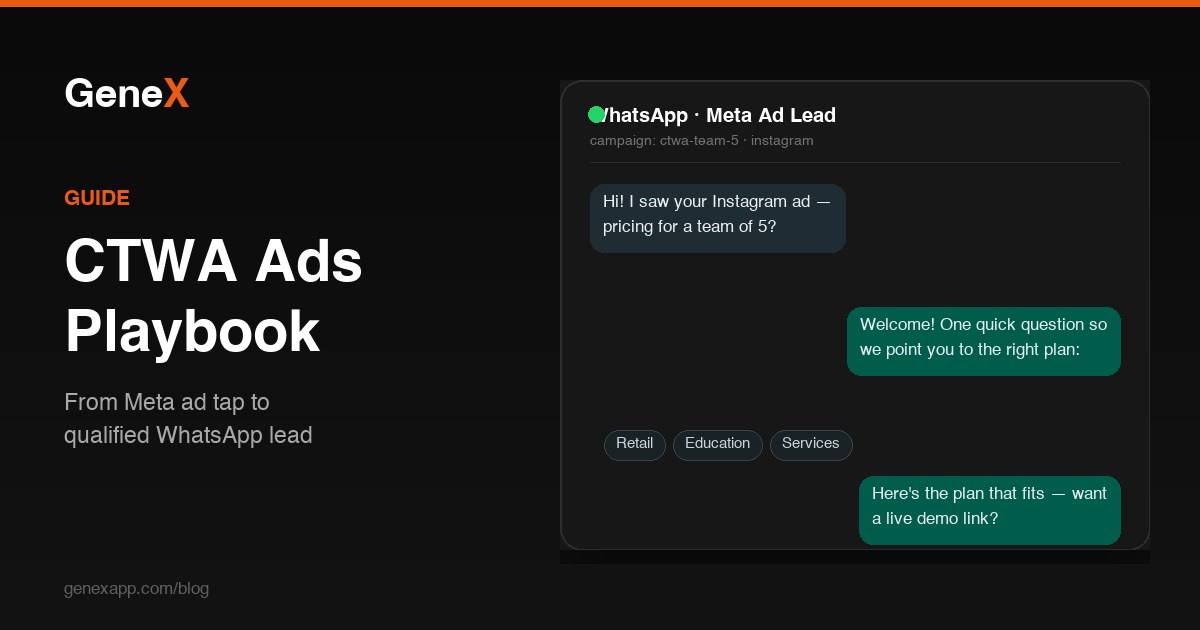
3. Pre-filled message. Customize the default message to something diagnostic — "I'd like to know pricing for my team (5 agents)" — so every conversation starts with a qualifying signal instead of "hi."
4. Placements. Let Meta auto-optimize across Facebook and Instagram feeds, Stories, and Reels early on; trim placements once you have enough conversion data to know where quality leads come from.
Designing the conversation funnel
The ad is only the first 5% of the work. Here is the funnel shape we run:
Instant welcome (0 seconds). An automated greeting fires before a human joins — acknowledgment plus one qualifying question ("Thanks for reaching out! What's your business about? Retail, education, services…?"). Free-form replies inside the 24-hour customer service window cost you nothing on the service side, so use them generously.
Qualify (first exchange). Two or three questions maximum: industry, team size, main use case. A quick-reply menu keeps mobile typing to a minimum. Leads that answer are routed; leads that vanish this early were never going to buy.
Route and respond (minutes, not hours). Data from our own campaigns is blunt: reply within 5 minutes and a large majority of chats continue; past 30 minutes, most never reply again. Route qualified chats to the right agent by segment, with full context attached — the ad they clicked, the pre-filled message, their answers.
Convert. Push toward a concrete next step while intent is hot: a pricing plan, a registration link, a booking slot for a demo. Every extra hop you add loses people; every step you can complete inside the chat keeps them.
The attribution mistakes that quietly kill ROAS
Most teams judge CTWA campaigns by cost-per-message and wonder why "cheap" leads never close. Fix the measurement layer:
- [ ] Track beyond the chat. Cost-per-message tells you about clicks, not revenue. Pipe conversation outcomes — qualified, registered, paid — back against campaign IDs. Tools differ, but the principle is universal: without a closed loop between ad spend and sales outcome, you are optimizing for chat volume.
- [ ] Use Meta's Conversions API where possible. Sending events back to Meta (lead created, purchase completed) lets the ad algorithm optimize toward people who buy, not people who merely chat. This is the single highest-leverage measurement upgrade for CTWA.
- [ ] Beware the window gap. Many CTWA conversations convert days later, outside the ad platform's attribution window your report defaults to. Review 7-day and 28-day views before declaring a winner.
Five mistakes we see (and made)
- [ ] Launching with no one to answer. Ads outpace the inbox; leads go stale; budget burns.
- [ ] Treating every chat as equal. Without qualification, your sales team drowns in unqualified chats and the real buyers hide in the noise.
- [ ] One number, no segmentation. All campaign types (retargeting, cold, promo) dumped into one queue with no tags — you can't tell which audience produces customers.
- [ ] Long text walls. Mobile readers skim. Short paragraphs, quick replies, one idea per message.
- [ ] No opt-out hygiene. Keep template outreach restrained and lists clean — sender quality is an asset that takes weeks to build and one careless blast to damage.
Checklist before you launch
- [ ] WhatsApp Business Platform account verified, number connected to your Facebook Page
- [ ] Welcome auto-reply and qualifying quick replies configured
- [ ] Team inbox staffed for your ad schedule hours (or AI-assisted off-hours coverage)
- [ ] CRM or tagging plan so chats are attributable to campaigns
- [ ] Conversion events (at minimum: lead, purchase) flowing back to Meta
- [ ] Creative that promises exactly what the chat will deliver
Ready to run CTWA campaigns properly?
GeneX is built for exactly this funnel: CTWA-ready WhatsApp numbers, a shared team inbox with routing and tags, AI-assisted qualification, and campaign-level attribution that shows which ads produce customers — not just chats.
See pricing plans or book a live demo — we will walk you through the same setup we run for ourselves.
WhatsApp and Meta are trademarks of Meta Platforms, Inc. GeneX operates on the official WhatsApp Business Platform as an authorized Meta Business Partner. References to WhatsApp and Meta are for identification purposes only and do not imply affiliation beyond that partnership.
Related articles
Ready to run these plays yourself?
Get started with GeneX — the free plan is live today, and every paid plan is covered by our 14-day money-back guarantee.